If you are working in a team of developers and have your project maintained at Github, then you probably would have to the situation where you would need to update your project to the commit of your team mate or you would need to get the changes from the branch of your team mate into yours. This blog is all about it and will walk you through the steps.

How developers commonly use Github
Cloning :
Cloning is when you get the code from another persons Repository or even from its own. It is done when you want to directly contribute to the respected project. One good thing about it is the maintainer of the repository doesnt even get a hint when you clone their Repo(will use Repo in short for repository), but so is not the case with Fork.
Steps to Clone:
git clone repository_link
now, to publish the changes you made on your PC to the Repo, there comes the concept called PUSH
Now,Whats Push ?
Like said before, it is to publish your changes to the repo online.
Steps to push are :
1) git add .
2) git commit -m "commit message"
3) git remote add origin "repo link"
4) git push -u origin master
the command 3 above is needed to be done for first time only :)
Branching and merging
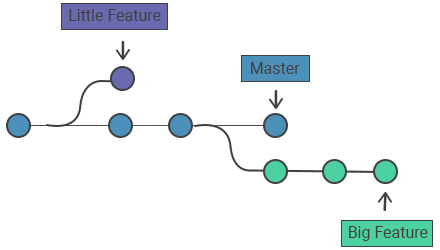
To create a branch
git checkout -b "branch name"
the branch we create moves independently with respect to other branches. The changes in another branch are not reflected in the branch you make ---unless you PULL them and the MERGE them.
MERGING :
Steps to merge another branch into your branch
1) git checkout "branch name you want to merge"


git merge "the branch name you just pulled"
Thats all for branching and merging.